
- Complete IT Solutions for a Digital World
Mobile App Features We Recommend for Different Businesses
Discover essential mobile app features for businesses, including online payments, booking systems, customer support, security, and business management tool
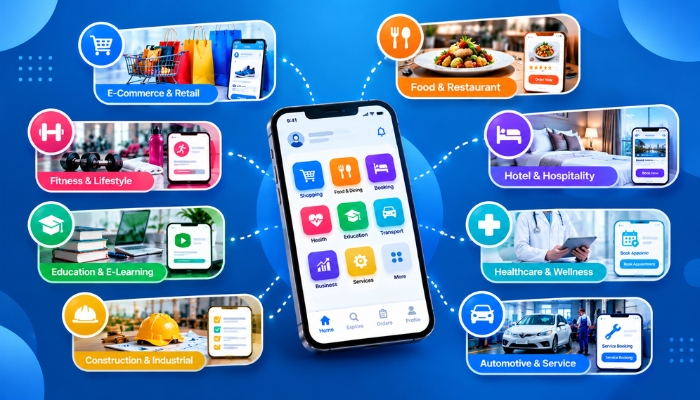
Every business has different goals and customer needs. A mobile app can help businesses connect with customers, manage daily tasks, accept orders, and provide better services. However, the right mobile app features depend on the type of business and the problems it wants to solve.
At Technology Xtend, we believe a useful app should be easy to use, solve real business problems, and provide value to customers. Here are some important business mobile app features that businesses can consider when planning mobile app development.
1. User Registration and Login
A simple user registration and login system helps customers create accounts and access personalized services. Businesses can offer email registration, mobile number verification, or other suitable login options.
We recommend keeping the registration process simple so users can access the app without unnecessary steps. A user-friendly mobile app design can make the process easier.
2. Online Shopping and Payment Features
E-commerce mobile app development requires features that make online shopping simple and convenient. Customers should be able to browse products, check prices, add items to their cart, and place orders.
Useful features include:
- Product search and categories
- Shopping cart and checkout
- Secure payment integration
- Order confirmation and tracking
- Order history
These e-commerce app features can help online stores provide a smoother shopping experience and manage customer orders more efficiently.
3. Booking and Appointment Management
Service businesses, clinics, salons, and consultants can benefit from appointment booking app features. Customers can check available time slots and book services through the app.
We recommend features such as appointment scheduling, booking confirmation, cancellation options, and reminders. These mobile app solutions for businesses can help organize appointments and reduce manual coordination.
4. Push Notifications and Updates
Push notifications allow businesses to share important updates directly with app users. They can be used for order status updates, appointment reminders, new services, and important announcements.
Notifications should be useful and relevant. Sending too many unnecessary alerts may cause users to turn them off. Well-planned mobile app notifications can help businesses maintain communication with customers.
5. Customer Support and Live Chat
Customers may need help with orders, bookings, payments, or other services. Adding customer support features makes it easier for them to contact the business.
Depending on business requirements, an app can include live chat integration, support forms, frequently asked questions, or a direct contact option. These features help customers find answers and report problems more conveniently.
6. Loyalty Programs and Special Offers
Retail stores, restaurants, and e-commerce businesses can use mobile app loyalty programs to encourage repeat purchases. Customers may receive points, rewards, or special offers based on their activity.
A well-planned loyalty system can help businesses build stronger customer relationships. The rewards should be easy to understand and simple to use.
7. Location and Map Integration
Location and map integration can be useful for delivery services, travel businesses, local stores, and companies that provide services at customers' locations.
Depending on the app's purpose, businesses may include store locations, delivery tracking, service-area information, or map directions. Location access should only be requested when it is needed for a clear purpose.
8. User Profiles and Personal Settings
A user profile management system allows customers to manage their personal details and preferences. Depending on the business, users may also save delivery addresses, view previous orders, manage bookings, or update contact information.
We recommend including only the information that the app genuinely needs. A simple profile makes the app easier to manage and use.
9. Reports and Admin Dashboard
Many businesses need a way to manage app activity from one place. A mobile app admin dashboard can help authorized staff review orders, manage products, check bookings, update information, and monitor important business data.
Business reports and analytics can also help owners understand sales, customer activity, and service performance. The right dashboard features depend on the business's daily operations.
10. Security and Data Protection
Mobile apps may handle personal details, contact information, orders, and payment-related data. Mobile app security and data protection are important for both businesses and customers.
We recommend suitable security measures such as secure data transmission, access controls, reliable authentication, and regular updates. Apps that process payments should use appropriate payment providers and follow relevant security requirements.
11. Reviews and Customer Feedback
Customer feedback features help businesses understand what users like and where improvements are needed. A feedback feature can allow customers to rate services, share suggestions, or report issues.
Businesses can review this information to identify common problems and improve their products or services over time.
12. Mobile App Features for Different Industries
Different industries need different custom mobile app development solutions. For example:
- Educational institutes: Student accounts, course information, online tests, and learning materials.
- Retail businesses: Product catalogues, stock information, order management, and loyalty rewards.
- Healthcare providers: Appointment booking, reminders, and access to appropriate patient information.
- Real estate businesses: Property listings, search filters, enquiry forms, and viewing appointments.
- Service companies: Service requests, appointment scheduling, status updates, and customer support.
- Delivery businesses: Order tracking, delivery status, and location features where required.
Choosing features based on business needs can help avoid unnecessary complexity and development costs. A suitable custom mobile app should support the way a business works.
How to Choose the Right Features for Your Mobile App
Before starting mobile app development services, businesses should consider a few important questions:
- Who will use the app?
- What problem should the app solve?
- Which features are essential for the first version?
- What information will the app collect and store?
- Will the app need to connect with existing software?
- How will the app be maintained and updated?
Starting with essential features can help businesses launch a practical app and add more functionality as their needs grow. Working with an experienced mobile app development company can help businesses plan the project around their goals and budget.
Build a Mobile App Around Your Business Goals
The best mobile app is not necessarily the one with the most features. It is the one that helps customers complete tasks easily and supports the business's daily operations.
Technology Xtend provides technology solutions for businesses looking for custom mobile app development based on their requirements. By planning the right features from the beginning, businesses can create a mobile app that is practical, user-friendly, and ready to support future growth.
If you are planning a mobile app for your business, identify your main goals and customer needs first. This will help you decide which features to prioritize and create a more useful experience for your users.